CleanSync connects OwnerRez to Jobber, the platform many professional cleaning companies run their business on. Once connected, every booking on the properties you choose to share automatically becomes a scheduled cleaning job on your cleaning company's Jobber calendar. Cancellations close the job, reschedules move it, and CleanSync fills in the Cleaning Date on your OwnerRez booking so you can see each turnover is handled without texting your cleaner.
CleanSync is built for the cleaning company side of the relationship: it is the only Jobber-native option among OwnerRez's housekeeping integrations, and it is the cleaning company that installs and runs it. You stay in control of exactly which properties are shared.
Who uses what:
| Role | Tool | What they do |
|---|---|---|
| Property manager / owner | OwnerRez | Connects once, picks which rentals to share |
| Cleaning company | Jobber + CleanSync | Receives a scheduled cleaning job per checkout |
Contents: Steps for integration · What your cleaner sees · What you see on your bookings · What Data is Transmitted · Disconnecting · Troubleshooting
Requirements
- The cleaning company needs a Jobber account with the CleanSync app installed (available in the Jobber App Store; start at https://cleansync.io).
- The property manager or owner needs an active OwnerRez account.
Steps for integration
The connection starts with an invite from your cleaning company and takes about 30 seconds on your side. (If your cleaner does not use CleanSync yet, point them at https://cleansync.io/ownerrez/start, which gets them set up first.)
-
Your cleaning company sends you a one-time CleanSync invite link (by email or text).
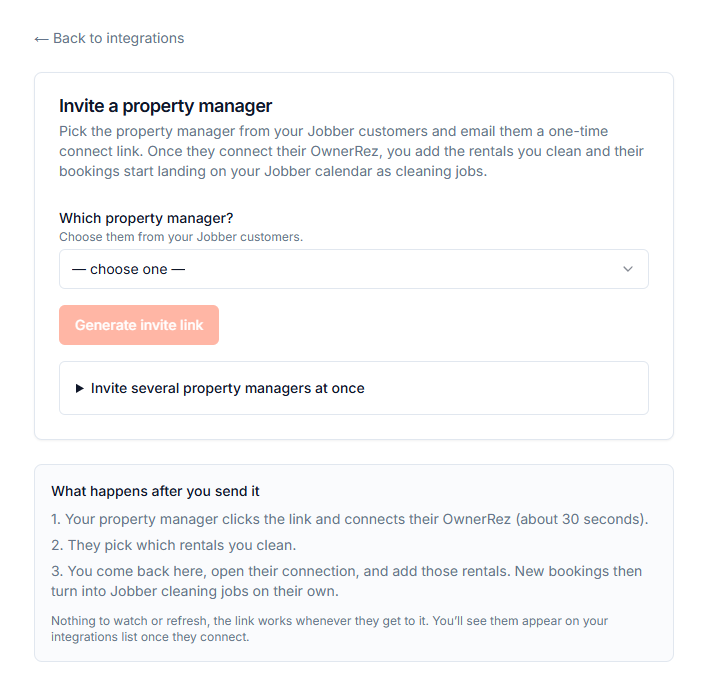
What your cleaning company does to send the invite.
-
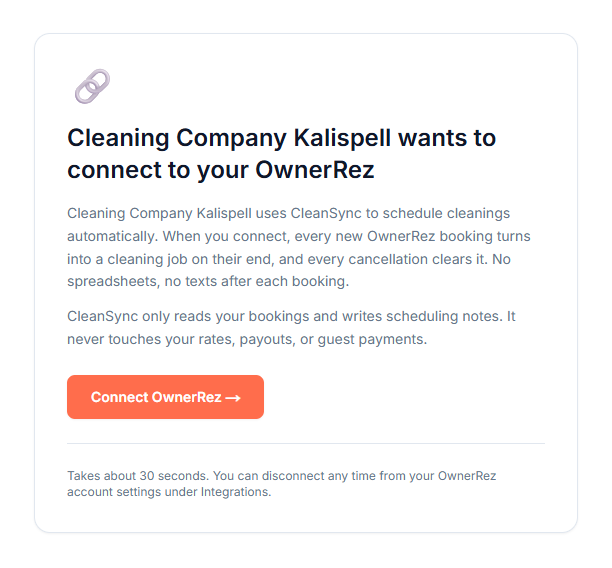
Click the link. You will see who is asking to connect and exactly what they are asking for, then continue to OwnerRez.
-
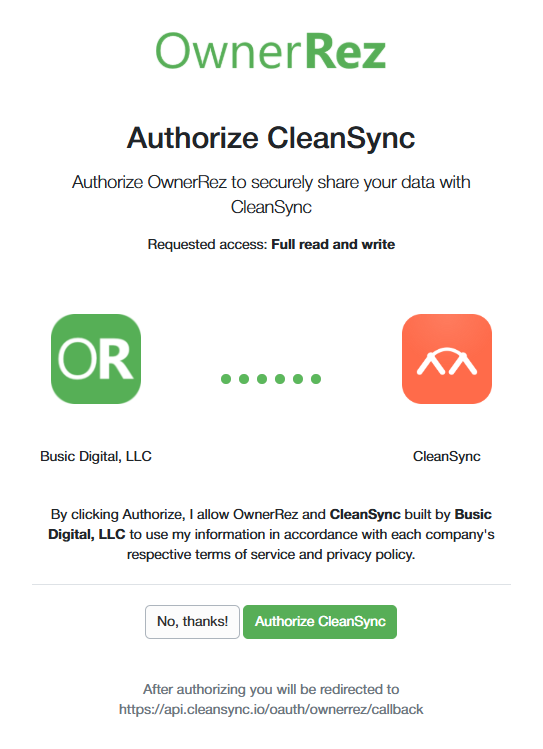
Authorize CleanSync on OwnerRez's standard authorization page.
-
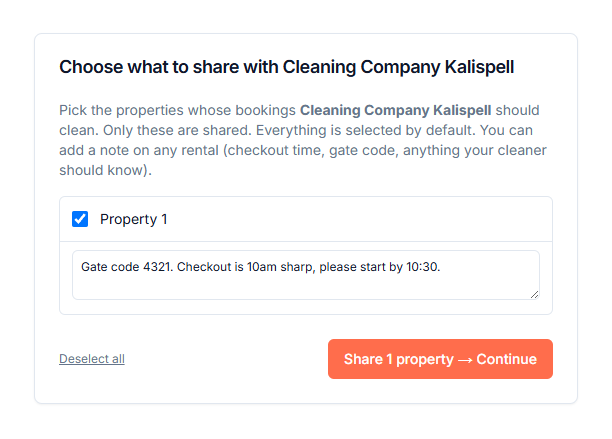
Choose which properties to share with this cleaner. Only the properties you check are visible to them. You can add an optional note on any rental (gate codes, checkout quirks, anything the crew should know).
-
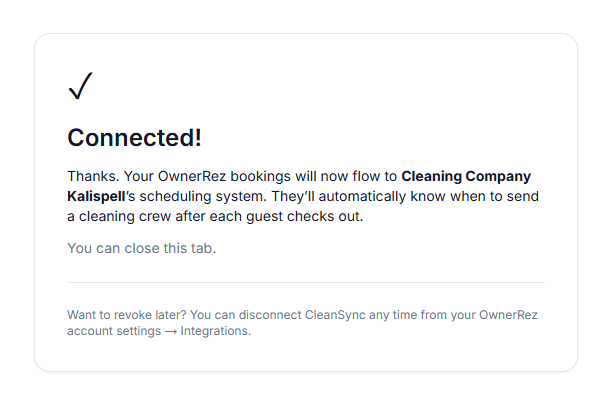
That's it. You will land on a confirmation page, and from here everything is automatic. Your cleaner adds the rentals they service on their side, and every new booking becomes a scheduled cleaning job in their Jobber.
What your cleaner sees
Your cleaner picks the shared rentals up inside CleanSync, matches each one to the property address in their Jobber, and confirms the cleaning schedule and pricing. After that, each checkout on a shared rental produces a cleaning job on their Jobber calendar, scheduled after the guest leaves, with the booking dates, your per-rental note, the door code when one is on the booking, and the guest name and party size when the booking provides them.
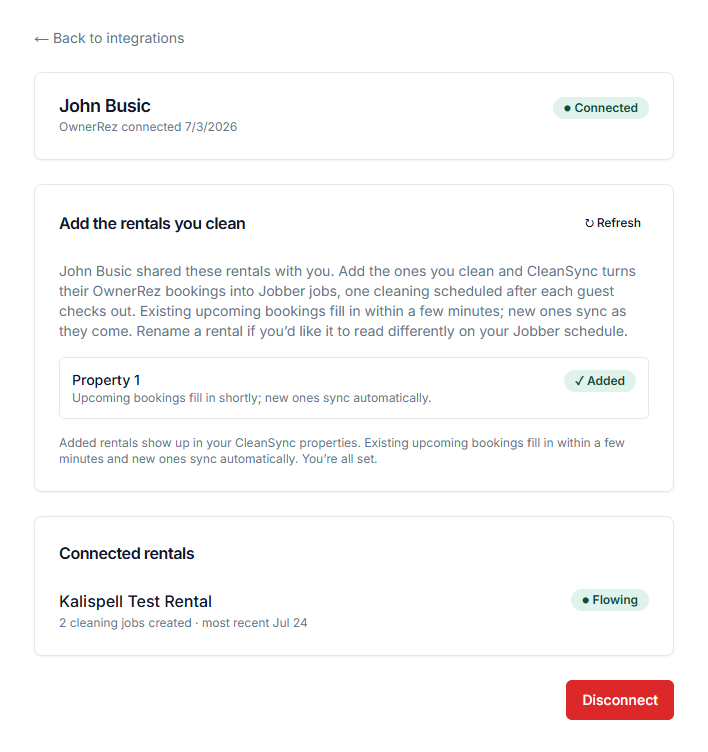
What your cleaner sees after you connect and share rentals.
What you see on your bookings
When a cleaning is scheduled, CleanSync sets the booking's Cleaning Date in OwnerRez to the day and time of the cleaning on your cleaner's Jobber calendar, so it shows in the calendar ribbon and booking views you already use. If the booking's dates change, the Cleaning Date moves with the cleaning. If you change the Cleaning Date yourself, CleanSync leaves it until the booking's dates change.
CleanSync also adds a short, tagged note to the booking when a cleaning is completed or called off:
[CleanSync] Turnover cleaning completed[CleanSync] Turnover cleaning cancelled, no crew will be dispatched
Notes are append-only and idempotent: your existing booking notes are always preserved, and the same line is never added twice. If a checkout and a check-in land on the same day, the cleaning job is flagged as a same-day turnover so the crew knows time is tight.
What Data is Transmitted
Read from OwnerRez by CleanSync:
- Property details: id and name (so you can pick what to share and your cleaner can see what was shared)
- Bookings on shared properties only, in real time:
- Booking id and status (booked / cancelled)
- Arrival and Check Out dates and the checkout time
- Guest name and party size, when the booking provides them (used on the Jobber job so the crew can identify the turnover)
- Door code (if present on the booking)
- Your OwnerRez account id at connect time (used to route webhook events to the right connection)
Sent to OwnerRez by CleanSync:
- The booking's Cleaning Date (the scheduled cleaning day and time).
- Status notes appended to the booking's notes field (the
[CleanSync]lines above).
Nothing else is written.
Received but never used or saved: OwnerRez includes these in the booking and guest records it sends. CleanSync ignores them and does not store them.
- Rates, charges, and booking totals
- Guest contact details (email, phone)
Never accessed:
- Payouts and invoices
- Guest payment details
- Guest messages
Webhooks: yes. CleanSync subscribes to OwnerRez Booking and Property webhook
events, delivered to a single endpoint
(https://api.cleansync.io/ownerrez/webhook) and verified with HTTP Basic Auth
using the credentials configured on the CleanSync OAuth app. Webhooks make the
sync real-time (a new booking typically becomes a Jobber job within seconds), and
an hourly reconciliation sweep re-checks recent bookings on every active
connection so a missed delivery self-heals within the hour.
Disconnecting
- You can revoke CleanSync's access from within OwnerRez at any time. Revoking stops all syncing; existing Jobber jobs are left as they are.
- Your cleaning company can also disconnect from their CleanSync dashboard.
Troubleshooting
The invite link says it is expired or already used. Invite links are one-time and short-lived by design. Ask your cleaner to send a fresh one (one click on their side).
I connected but my cleaner says no rentals are showing. Check that you selected the properties to share on the consent step. Your cleaner can hit "Check again" on their import screen once you have.
A guest cancelled. What happens to the cleaning job? The job in Jobber is renamed to show the cancellation, closed, and archived. Nothing is deleted, so the history stays auditable.
Do I need a CleanSync or Jobber account? No. You only authorize OwnerRez and pick rentals. Everything else lives in your cleaner's Jobber.
Support
Questions or issues: support@cleansync.io or https://cleansync.io.